What Is the Best Viewing Angle for a Laptop Privacy Screen?
Choosing the right viewing angle is one of the most important decisions when buying a laptop privacy screen. A privacy filter should allow the intended user to view the screen comfortably from the front while making on-screen information harder to see from the sides.
For most standard 2-way laptop privacy screens, the goal is to provide a clear, comfortable front viewing position while limiting visibility from the left and right. However, there is no single viewing angle that is best for every user or application. The ideal balance depends on the laptop, working environment, screen brightness, and privacy requirements.
This guide explains how laptop privacy screen viewing angles work, what buyers should look for, and how to choose a suitable privacy filter for business or personal use.
1. What Does Viewing Angle Mean for a Laptop Privacy Screen?
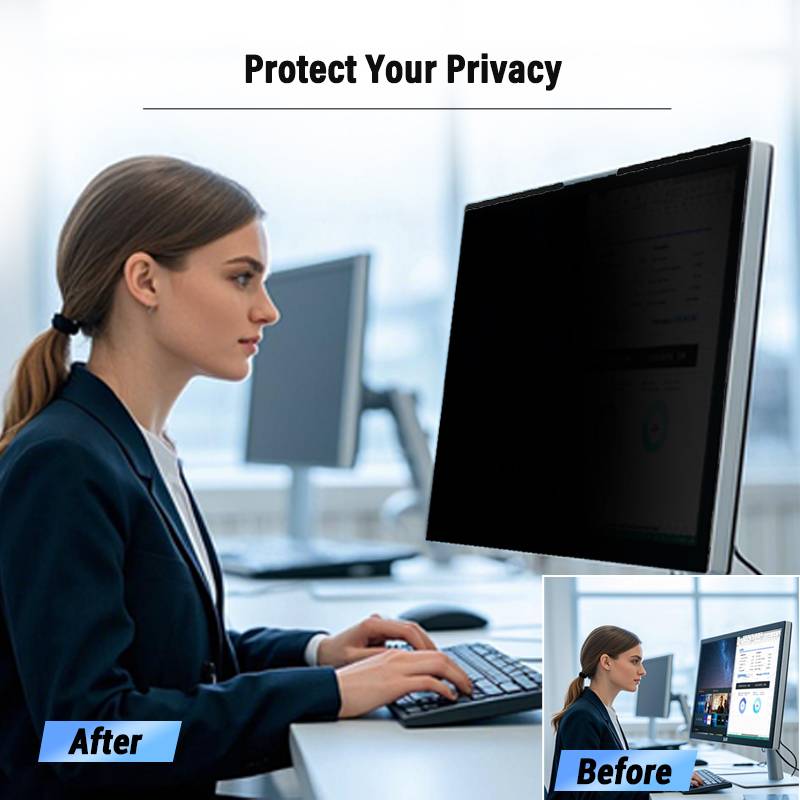
The viewing angle describes the direction from which a person can see the content on a display.
Without a privacy filter, a laptop screen can generally be viewed from a relatively wide range of positions. Although brightness and image quality may change when viewed from the side, the screen content may still be readable to nearby people.
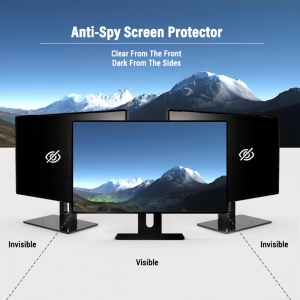
A laptop privacy screen changes this viewing behavior by controlling the direction of light passing through the filter.
-
Front viewing angle: The area in front of the screen where the intended user can comfortably read the content.
-
Side viewing angle: Positions to the left or right where the filter reduces screen visibility.
-
Privacy angle: The range of viewing positions over which the filter provides its intended level of visual privacy.
A key point for buyers is that viewing angle and privacy angle are not always defined in the same way by every manufacturer. Always check the supplier's measurement method before comparing numerical specifications.
2. What Is the Best Viewing Angle for a Laptop Privacy Screen?
For most everyday laptop applications, a 2-way privacy screen that maintains comfortable front visibility while restricting left- and right-side viewing is a practical choice.
The best viewing angle depends on the balance between two requirements:
-
Usability: The laptop user should be able to see the screen clearly while sitting in a normal working position.
-
Privacy: People sitting beside the user should have more difficulty viewing sensitive information.
A privacy filter with a very restrictive viewing range may offer stronger side-view privacy but could make the screen less convenient when the user moves away from the central viewing position.
A wider viewing range may provide more flexibility for screen use but could allow more visibility from nearby positions.
Therefore, the best choice is not necessarily the narrowest possible viewing angle. It is the viewing range that provides an appropriate balance between everyday usability and privacy.
Is a 30-degree viewing angle good for a laptop privacy screen?
A figure such as 30 degrees may appear in privacy filter product specifications, but buyers should first confirm what the number represents.
For example, a manufacturer may describe a viewing range measured from the center of the screen, while another may use a different reference point or testing method. These figures should not be treated as directly comparable without understanding their definitions.
When evaluating a product, ask:
-
Is the angle measured from the screen's centerline?
-
Does the specification describe the visible range or the privacy cutoff?
-
Is the measurement based on brightness, contrast, or content readability?
-
Are the left and right sides tested under the same conditions?
Clear definitions help prevent misunderstandings when comparing products from different suppliers.
3. How Does a Privacy Screen Limit Side Viewing?
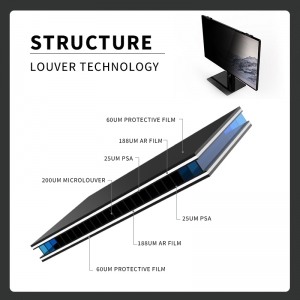
Many conventional laptop privacy filters use micro-louver technology to control the direction of light.
The filter contains tiny light-blocking structures that work like miniature vertical blinds. Light traveling toward the intended front viewer can pass through the openings, while more oblique light is blocked.
<AsyncImage query="laptop privacy filter front view side view comparison micro louver technology technical illustration" aspectRatio="16:9" width="100%" />
This creates two different viewing experiences:
-
From the front: The user can view the laptop screen through the filter.
-
From the side: The screen appears darker, reducing the visibility of displayed information.
The exact performance depends on the optical structure, filter design, screen characteristics, and viewing conditions.
This is why buyers should evaluate the actual product rather than relying only on a general viewing-angle claim.

4. What Factors Affect the Best Viewing Angle?
Several factors influence how a laptop privacy screen performs in real-world conditions.
1. Privacy filter design
The optical structure and design of the filter determine how light is transmitted and restricted at different angles. Different designs can provide different balances between front-view clarity and side-view privacy.
2. Laptop screen brightness
A brighter display may remain more noticeable from certain side positions. The perceived privacy effect can therefore vary depending on the laptop's brightness settings and display characteristics.
3. Screen size and aspect ratio
Different laptop screens have different dimensions and proportions. These differences can influence product compatibility and the way a filter is positioned on the display.
4. User position
The user's normal sitting position matters. Someone who frequently moves between the center and side of a laptop may prefer a different balance of usability and privacy from someone who works in a fixed position.
5. Ambient lighting
Bright environments, reflections, and surrounding light sources can affect how easily other people see screen content. A filter should be evaluated under conditions similar to its intended use.
6. Installation and fit
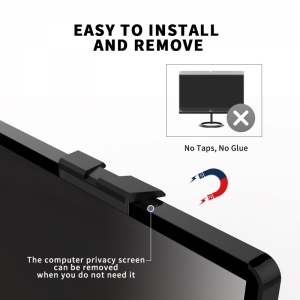
A privacy filter must be correctly aligned with the display. Incorrect positioning or an unsuitable mounting method can affect the user experience and intended privacy performance.
5. Which Viewing Angle Is Best for Different Working Environments?
The ideal privacy filter depends on where and how the laptop is used.
| Working environment |
Main privacy concern |
Buying consideration |
| Open-plan office |
Colleagues sitting nearby |
Balance front visibility with left- and right-side privacy |
| Airport or train |
Nearby passengers |
Consider a filter designed for frequent mobile use |
| Coffee shop or shared workspace |
People sitting beside the user |
Prioritize practical side-view privacy |
| Corporate office |
Exposure of business information |
Evaluate privacy performance and device compatibility |
| Financial or administrative work |
Sensitive documents and records |
Test front clarity and side visibility under realistic conditions |
For most standard business applications, a 2-way laptop privacy filter is a practical starting point when the primary concern is people viewing the screen from the left or right.
However, buyers should consider the actual working environment before selecting a product.
6. How to Test a Laptop Privacy Screen's Viewing Angle
Before purchasing in bulk, businesses and individual users can evaluate a privacy filter through a simple practical test.
Step 1: Set up the laptop
Install the privacy filter according to the manufacturer's instructions. Make sure it is correctly aligned with the display.
Step 2: Check front-view clarity
Sit in the normal working position and view text, spreadsheets, and other typical screen content. Check whether the screen remains comfortable to use.
Step 3: Check left-side visibility
Move gradually toward the left side of the laptop and observe how the screen's appearance changes.
Step 4: Check right-side visibility
Repeat the process from the right side. Compare the results with the left side.
Step 5: Test under realistic lighting
Repeat the test in the environment where the laptop will normally be used. Ambient light and screen brightness can influence the result.
Step 6: Evaluate daily usability
Check whether the filter remains convenient when opening, closing, and using the laptop throughout the day.
For B2B buyers, this test should ideally be performed using representative laptop models before approving a large order.
7. What Should B2B Buyers Look for When Comparing Viewing Angle Specifications?
For distributors, importers, corporate IT departments, and private-label brands, viewing angle is only one part of the purchasing decision.
Consider these additional factors:
-
Clearly defined specifications: Confirm how the manufacturer measures and describes viewing angles.
-
Front-view clarity: Check readability, brightness, and visual comfort from the intended position.
-
Side-view performance: Evaluate how effectively the filter reduces visibility from both sides.
-
Model compatibility: Confirm screen dimensions, aspect ratio, bezel design, and mounting requirements.
-
Product consistency: Ask how the manufacturer maintains consistency between samples and bulk production.
-
Customization options: Discuss available dimensions, product configurations, branding, and packaging.
-
Sample testing: Request samples and test them on the intended laptop models before confirming specifications.
A reliable sourcing process should compare actual product performance, not just numbers printed on a specification sheet.
8. Frequently Asked Questions
What is the ideal viewing angle for a laptop privacy screen?
There is no universal ideal angle for every laptop privacy screen. Most standard 2-way designs aim to maintain comfortable front visibility while reducing visibility from the left and right. The best choice depends on the user's position, privacy requirements, and the filter's optical design.
Does a narrower viewing angle mean better privacy?
Not necessarily. A narrower viewing range may restrict side visibility more strongly, but it can also make the screen less convenient to view when the user moves away from the center. Buyers should balance privacy performance with everyday usability.
Can people still see my laptop screen from the side when using a privacy filter?
They may still notice light or shapes on the display, depending on the product and viewing conditions. A privacy filter reduces side visibility but does not guarantee that screen content is completely invisible from every angle.
Does a laptop privacy screen affect front-view brightness?
It can. Privacy filters control light transmission, so the screen may appear less bright compared with using the display without a filter. The actual effect depends on the filter design and the laptop display.
Are 2-way and 4-way privacy screens different?
Yes. A 2-way privacy filter generally restricts viewing from the left and right sides. A 4-way design is intended to restrict viewing from additional directions, including above and below, depending on the product design. Buyers should confirm the actual viewing directions and specifications with the manufacturer.
How can I compare viewing angles from different privacy filter suppliers?
Ask each supplier to define its measurement method, reference direction, test conditions, and performance criteria. Then compare samples under consistent conditions using the same laptop model and display settings.
Conclusion
The best viewing angle for a laptop privacy screen is the one that provides comfortable front visibility while reducing unwanted side viewing in the user's actual working environment.
For most standard business applications, a 2-way privacy filter is a practical option when protection from left- and right-side viewing is the main requirement. However, buyers should evaluate optical performance, front-view clarity, screen compatibility, and installation requirements together.
YIPI (Shenzhen Xinpai Electronics Co., Ltd.) focuses on laptop and monitor privacy filter products for business applications. Whether you are a distributor, importer, corporate buyer, or private-label brand, our team can discuss your target laptop models and privacy filter requirements.
Contact YIPI to discuss your laptop privacy filter sourcing needs.
Website: https://www.privacyfilter.com/
Contact: https://www.privacyfilter.com/contact/contactc.html